automating obsidian to github pages
goals
- write notes and pages in obsidian
- keep obsidian as the main editing interface
- sync obsidian content into the hugo project
- build the site locally in wsl
- commit and push the source site to github
- publish the generated site through github pages
architecture overview
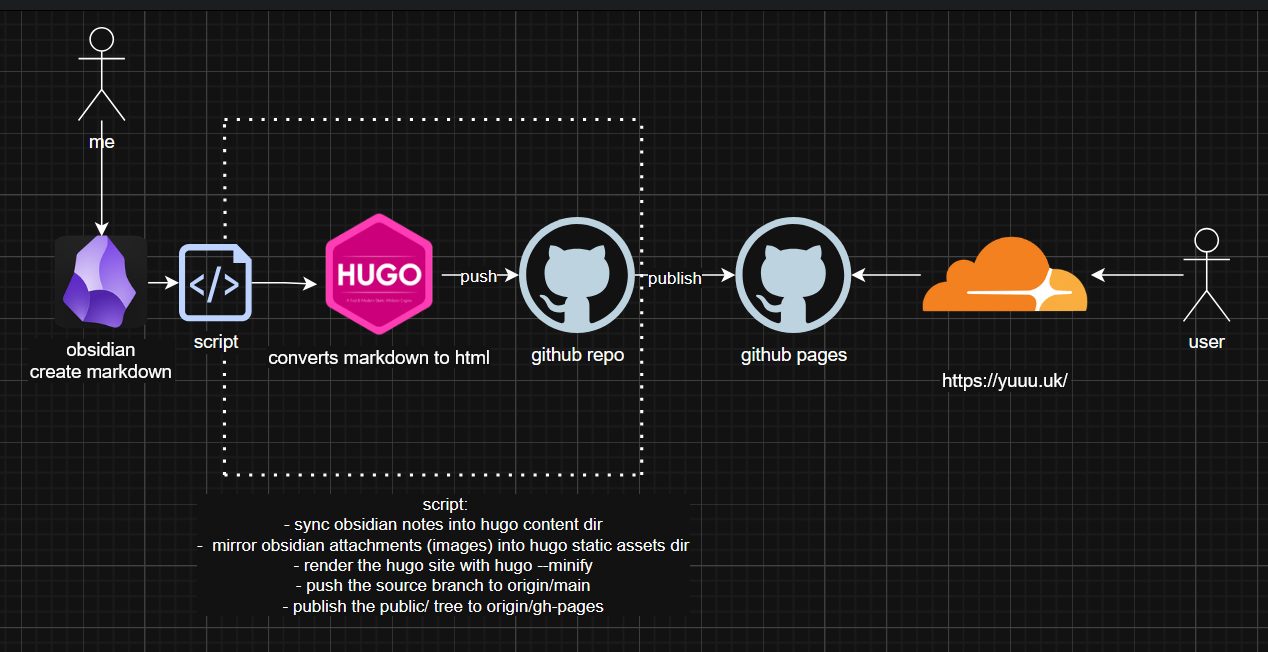
1obsidian vault
2  -> powershell deployment script
3  -> wsl hugo project
4  -> hugo build generates public/
5  -> git push main
6  -> git subtree split public/ to gh-pages
7  -> github pages deploys the published branch
8  -> yuuu.uk serves the final site
how the setup is organized
the source of truth is the obsidian vault at e:\icloud\iclouddrive\obsidian\notes.
inside that vault:
- the source notes folder contains the site’s note content
pages/contains editable site pages such as the homepage- pasted images and other supported attachments are stored in the vault and can be embedded directly in notes
the hugo site lives in wsl at /home/ubuntu/blog/blog. the deployment script copies content from the obsidian vault into the hugo project before each build.
the deployment script
the deployment script is a powershell entry point, but the actual hugo and git work runs inside wsl because the site itself is stored there.
when i run the script, it performs these steps:
- it validates the required paths and checks that
rsync,hugo, andgitare available in wsl. - it mirrors obsidian notes into
content/noteswithrsync --delete, so deleted notes are removed from the hugo content tree as well. - it syncs site pages from
pages/into hugo’scontent/directory, which makes the homepage and other section pages editable from obsidian. - it copies image attachments from the obsidian vault into
static/obsidian, while excluding obsidian metadata folders and trash. - it normalizes image filenames into lowercase, hyphenated slugs and rewrites obsidian embeds such as
into standard markdown image links that hugo can publish reliably. - it builds the site with
hugo --minify --buildFuture, which also allows future-dated notes to be rendered. - it stages, commits, and pushes the source repository to
mainover ssh. - it publishes the generated
public/directory togh-pagesusinggit subtree split, and github pages serves that branch.
github setup
- the repository was created on github and configured for ssh-based pushes
- the hugo source, templates, and automation script are stored on
main - the generated static site is published from the root of the
gh-pagesbranch - the custom domain
yuuu.ukis connected through github pages and the published output includes acnamefile
why this workflow works well
this setup keeps each tool focused on one responsibility:
- obsidian is the writing environment
- hugo is the static site generator
- git and github provide version control and remote storage
- github pages hosts the final published files
that separation keeps the workflow simple: write in obsidian, run one script, and let the deployment branch update the live site.
operational notes
a few details are important for long-term maintenance:
- the notes sync excludes
_index.md, because section index pages are managed separately - page sync and note sync are intentionally different: notes are mirrored more aggressively, while pages are copied into
content/ - only common image formats are mirrored into
static/obsidian - the published branch is force-pushed so that
gh-pagesalways matches the latest generated build - fenced markdown code blocks written in obsidian are rendered by hugo during the build
result
the result is a manual but reliable publishing pipeline.
i can write notes and pages in obsidian, paste images directly into notes, run one powershell script, and publish the updated site through github pages without opening the hugo project manually.
the deployment is not literally instant, but once the script pushes the updated branches, github pages usually refreshes the site after a short delay.
references
- hugo command reference: https://gohugo.io/commands/hugo/
- hugo syntax highlighting: https://gohugo.io/content-management/syntax-highlighting/
- github pages publishing source: https://docs.github.com/en/pages/getting-started-with-github-pages/configuring-a-publishing-source-for-your-github-pages-site
- github pages custom domain: https://docs.github.com/en/pages/configuring-a-custom-domain-for-your-github-pages-site/managing-a-custom-domain-for-your-github-pages-site
- obsidian accepted file formats: https://help.obsidian.md/file-formats
- obsidian attachments: https://help.obsidian.md/attachments
- obsidian embeds: https://help.obsidian.md/embeds
- rsync man page: https://rsync.samba.org/ftp/rsync/rsync.1.html